
What to Vibe-code and What Not
Vibe‑code with purpose: how to ride the flow without getting burned

I believe vibe coding is one of the ultimate and most powerful ai levers we have, when you use it right.
But what even is vibe coding? Let’s hear it from the tweet that invented it;
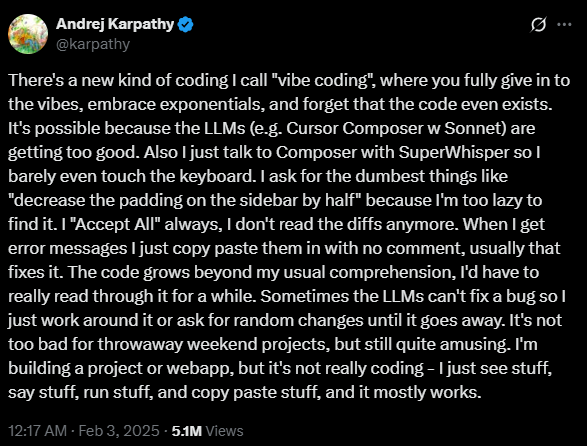
Karpathy nailed it: “You fully give in to the vibes ... forget that the code even exists ... I just see stuff, say stuff, run stuff, copy-paste stuff, and it mostly works.”
So let’s get on the same page for this article: for me, vibe coding means directing AI to write code you don’t bother fully understanding while you’re in the flow. Does that mean you couldn’t understand it if you tried? Nope. Could you code it yourself? Probably. You just choose not to, because you’re vibing.
1. Prototypes
Prototyping is a science and an art imho.
Human Computer interaction has taught engineers the value of rapid low and high fidelity prototyping.
We drew screens and buttons on paper, cut them out to simulate different user interactions, and design quick a/b tests.
Rapid prototyping turns ideas into tangible, measurable tests quickly, surfacing issues, user insights at almost no cost in very little time.
Then we can go back to the drawing board and do it again.
The earlier you can test, the more leverage you’ll get.
We turned to paper prototyping and figma because it was cheaper and faster to build many different prototypes that may or may not be functional.
Figma still takes me more time than drawing on paper and cutting things out.
The overhead was worth it because of the added realism in higher-fidelity prototyping.
But now I can draw something on paper, scan it, talk to Claude, ChatGPT, or Gemini.
And boom, running prototype in minutes.
Rapid experimentation, no hand-holds
Loop: “Generate three variants with a sliding menu, one without animation, one with bigger buttons”
You get all versions in seconds. Send them to real humans; iterate before with feedback. That’s where vibe coding shines: speed gives you leverage.
I remember Andrew Ng saying on the “No Priors” Podcast recently, before building prototypes was your bottleneck, now gathering feedback is, because it’s faster to build prototypes than gather feedback and that’s true.
AI as a critical friend
Ask it to review your wireframe: “Break this. Where am I guessing wrong?” It pushes back. You refine. You test again.
Prototyping via AI beats drawing on paper because... you get something functional fast. That’s leverage.
Because the code never leaves your sandbox, the security stakes stay low.
You don’t have to write detailed design documents and hypothesize a user journey; you can test it live.
Move things around quickly, put it in the hands of a few trusted individuals, see what breaks, make multiple versions, add features or remove them quickly, remove buttons, add sliders, change colors, effects, break things, start over.
Purdue studied and published a paper on this new form of prototyping.
2. Personalized automations and tools
How often do you sit at a computer and think; I wish this software did this, or go through motions you can already do without thinking?
I felt like that a lot. Less now because the more specific you are, the better you can create software with AI.
This was never feasible before because, well, it was expensive, and no software company would build software with only a handful around the world.
That is still the case; but with AI Coding Assistants, you can do that yourself. And for a lot of use cases, if you don’t share this software or upload it anywhere, there also is not a lot of security risks if it just runs on your computer.
Tiny helpers for your repetitive tasks
Batch-post convert and optimize social media posts
Automatically add any purchase you make to your personal expense tracker sheet
Clip notes to your Fantasy Premier League Folder and assign it the right tags to review
Send a message with the shopping list or todos in the family group chat
Organize all your newsletters into a single newsletter
Auto-summarize PDFs in your downloads folder
Generate weekly habits, fitness, food and anything trackers with Obsidian, Sheets or anything else to coach you
Make a personal voice dictation app
These are some automations I made for myself. None of them took me very long, but they save me endless time and improve my life.
What not to Vibe-Code
In general, use common sense.
Would you trust a total stranger, some kid that someone on the internet once gave 5 stars on fiverr or upwork with this without checking it yourself?
You’ll have your answer.
But for completeness, here are some things you should absolutely not vibe code. That doesn’t mean not use AI to assist you.
It that whatever AI writes you should vet and understand, completely.
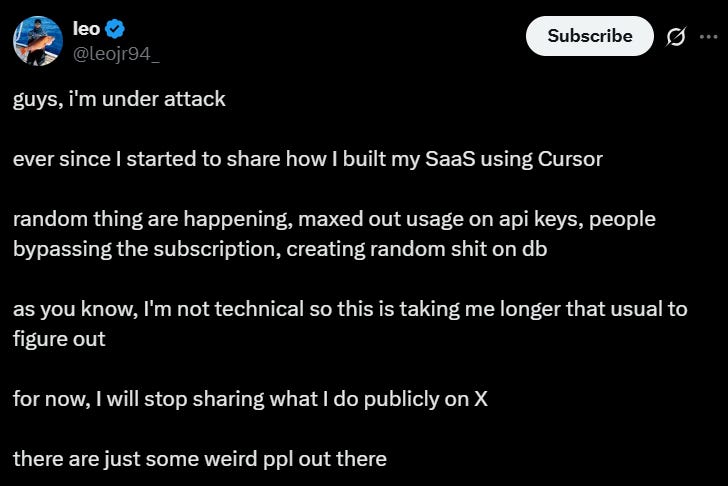
Anything in production that uses an API or credentials from you or your customers.
Do you still pay for LLMs?
There are scripts out there, shared and sold on Telegram scan GitHub for working API keys.
There are also endless bots that test sites for credentials directly.
That was a thing before, but now it’s become way too easy.
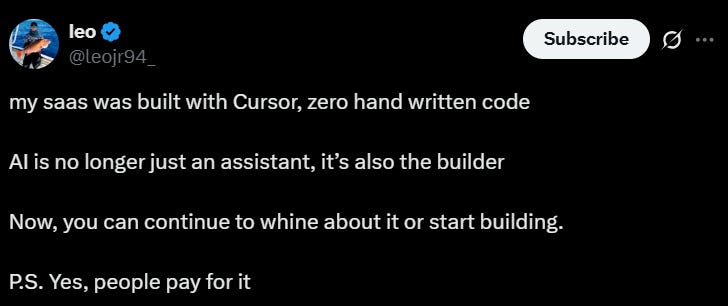
I don’t know if this was rage bait and actually real, but I know it’s happening a lot;
AI Assisted Coding vs. vibe coding
We’ve defined vibe coding as prompting AI to write code without fully inspecting it—letting the flow carry the process. But that’s just one end of a spectrum. On the other end? AI-assisted coding.
What is AI-assisted coding?
You prompt for logic, but you review every line.
You’re still architecting, debugging, and designing, just faster.
Tools like GitHub Copilot, IntelliCode, Tabnine have been speeding us up for years without sidelining our reasoning.
What makes vibe coding different?
And at the lower end of the spectrum we have vibe coding.
In true vibe mode, you “forget that the code even exists,” as Karpathy said. No reviewing. You iterate through feeling, not structure. That’s a fast, high-velocity creative sprint, not a code quality guarantee. And devs like Simon Willison put it bluntly: once you're reviewing and understanding every line, it’s not vibe coding—it’s AI-assisted, and that’s a good thing.
Andrew Ng has taken issue with the name because many people do not differentiate the two, AI assisted coding, or agentic coding is hard work, vibing is also that but in a different, fun, creative way.
AI Assisted Coding has it’s place because;
I think it can provide us with so much leverage in time and cost savings when prototyping as well as when automating personal tools.
I want to be clear that I think AI has a place in any programming or coding task now. It’s about being more deliberate when and how you use it.
As programmers, we always had to learn new tools to make us more productive and build better products.
Imho, this is no different. To stay on top of the game we have to learn new tools AI is versatile and vibe coding is definitely a practice that has it’s place and is here to stay.
Both styles can co-exist, AI assistance speeds up repetitive tasks while maintaining control and intent. Vibe coding injects that explosively creative flow when you're sketching ideas or launching prototypes.
Up next: I’ll walk you through my workflows and preferred platforms
how to ride the vibe, safely.
Some of my most valuable prompts, Agents.md Claude.md, Gemini.md, Cursor and Kiro Rules
Meanwhile, what’s your experience? Have you transformer-birthed your dentist’s app? What felt like vibe code—and what did you vet like a pro?