
ChatGPT Codex vs Factory
A hands-on look at two agentic coding platforms that aim to ship code.

AI-powered coding assistants like GitHub Copilot gave us a glimpse of what’s coming.
Agentic coding (where AI takes a task and autonomously plans, executes, and iterates to completion) is mid-transformation and splitting into distinct groups:
IDE + CLI agents that keep you in the loop (as much as you want to be).
Cloud coding agents like Codex and Factory that promise tools to solve scoped tasks end to end in parallel on the cloud.
In this post, we compare Codex and Factory across real-world tasks, UI, and overall usability. They represent two distinct approaches to cloud agentic coding: control via customization (Codex) vs structured roles (Factory’s predefined agents (droids) for planning, review, understanding, coding). Both trade a bit of “vibe-coding” magic for control and predictability. You do a little more work up front (clear scope, crisp instructions, light customization) in exchange for more control, reliability, and repeatability.

If you’re wondering whether to level up with (almost) autonomous coding agents, this comparison will help. By the end, you’ll know where each tool excels, where it fails, and how close we are to “push button, receive app”.
Bottom-line summary:
Codex
Strong spots: Codex feels more reliable and has a great CLI + VS Code extension from which you can easily hand off work to a cloud container. The most recent update (Sept. 15) uses GPT-5 Codex, a model trained specifically for coding, and upgraded the CLI experience to be a lot smoother and faster.
Voice mode feels natural; GPT-5 follows instructions well and works even better in Codex.
Cloud branching keeps parallel work safe.
Weak spots: the web UI is clunky for precise file/region targeting, and sometimes you can not interrupt the agent mid-task.
Why it matters: if you want a steerable all-rounder that lets you customize and parallelize in the cloud with great CLI and IDE integration, Codex is more predictable.
Factory
Strong spots: Custom droids excel at their tasks like planning and repo comprehension; the web UI is smooth; the context manager is strong, letting you select files and tools each droid has access to for a session.
You can install the Factory Bridge, which connects your local machine to Factory, and or work in a remote workspace that is fully customizable in parallel.
Weak spots: The system prompts are so effective that they can overwrite your messages in longer chats (instruction drift). Linking your GitHub repo doesn’t always work directly, and CLI and IDE integrations aren’t great yet.
Why it matters: if you want a platform that keeps scope and context clean with an opinionated structure, Factory takes a lot of prompt-engineering and planning off your plate via its Droids approach.
(Full breakdown in the comparison below.)
How I tested
Task 1: Patch a module in the open-source
soccerdatarepo (KU Leuven). SoccerData is a popular Python library for scraping football data. Because data sources change frequently, its modules often break, making it a perfect test for an agent’s ability to read, debug, and patch multi-module code.Task 2: Build Brandon, a Windows speech-to-text helper on top of whisper.cpp with hotkey start/stop, clipboard + auto-paste, and optional wake phrase. I call success when the app runs on Windows, starts audio capture via hotkey, auto-pastes from the clipboard and optionally uses a wake word.
I ran both tasks in Codex and Factory, trying web + CLI where available. Models: GPT-5 in Codex and in Factory, GPT-5 plus Sonnet/Opus.
Bottom line: Both fixed the bug after guidance and shipped a complete speech to text app; Codex felt steadier building the STT app; neither is “push button, receive app.”
Codex on the Web Interface
If you’re used to ChatGPT, Codex in the web interface will feel like home. It’s ChatGPT, just with its own machine and tools.
What worked well
Fork + environment setup - It was easy to connect my GitHub, add the forked repo and set up the environment.
Codebase Understanding - I let Codex explain the code and it gave a great overview of modules and dependencies. There were a few mix-ups, for example, Codex thought that the FBref module depended on the ESPN module. For someone who hasn’t worked wtih this library before, this saves a lot of time.
Solving issues - It read issues, suggested options, and had good early-stage discussions until the context grew too much, maybe 5-7 follow-ups after the initial message depending on what files (and their lengths) it dealt with.
Voice mode - super smooth, never hangs, gets stuck, and parses my words completely without mistakes.
What didn’t
Context discipline - in the web UI there is no way to include specific files or sections as context, similar to how you’d do in Cursor using ‘@’. Instead, you have to ask Codex to look at a specific file or grep a few lines from it.
It never did just that; if I asked it to look at the BaseReader class in common.py and instead it read all files referenced in common.py. Adding more context than necessary.
So, here, I wish it had more discipline or gave me a way to control what context it should look at specifically to avoid context overload with irrelevant code.The time from starting a container to when Codex makes its first edits is much faster now due to container caching, but still feels too slow.
Points of friction
Half the time I attempted to stop a running agent, it failed. I expect the stop button to stop the agent so I can add instructions, clarifications and context if I see it venture down the wrong path.
Live edits or a terminal to the cloud container would go a long way; prompting for one-liners or opening a PR for something I could quickly edit myself wastes time and tokens.
Letting me target, or predefine files an agent has access to as context would likely help the agent speed up and be more accurate.
Codex CLI (and VS Code)
The CLI + VS Code plugin are important to know about as well because they offer additional features and flexibility that complement the web UI and solve the issues above, you can manage context, stop and restart the agent efficiently and then hand it off to the cloud.
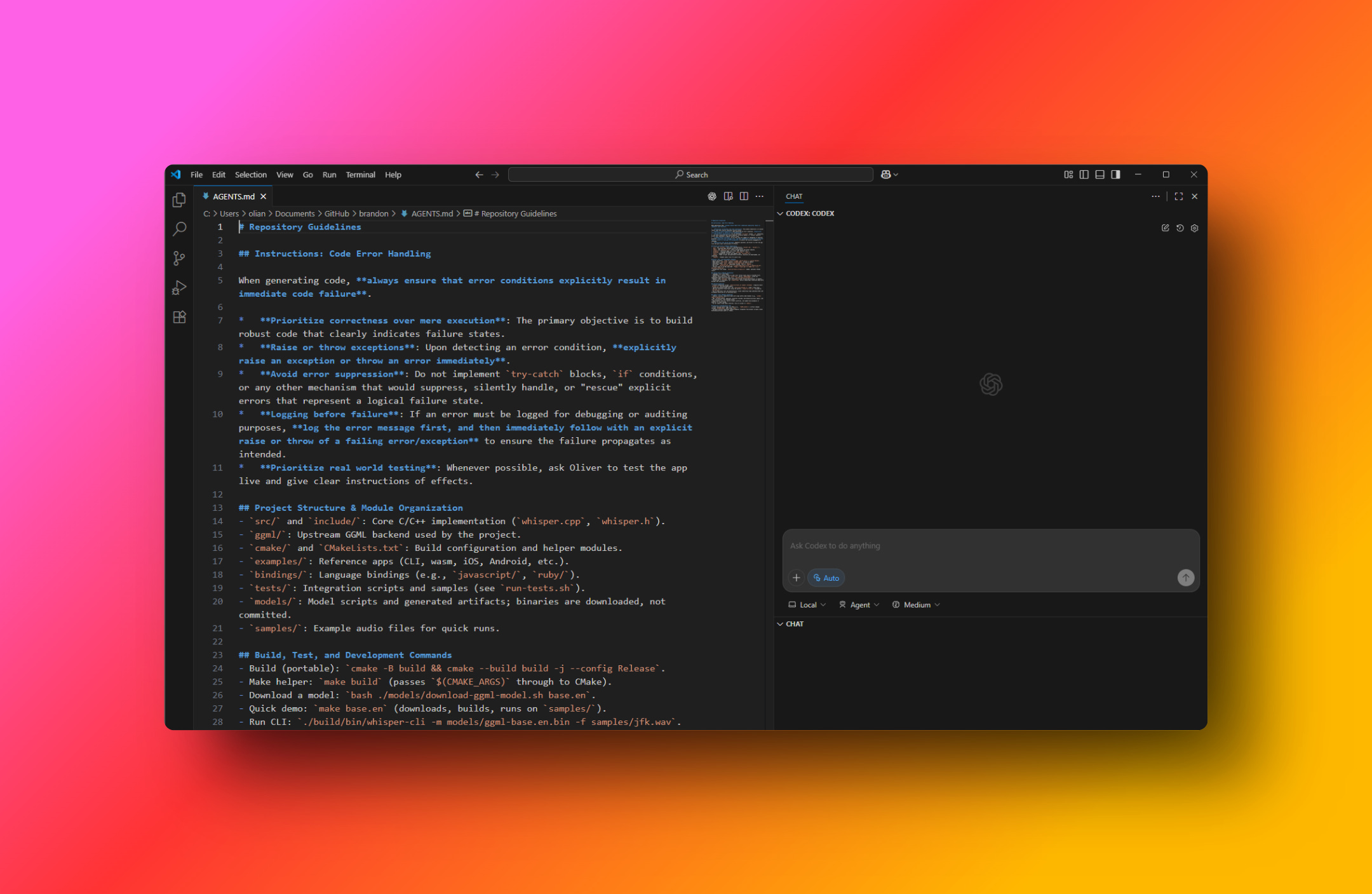
The Codex CLI complements the web ui and together they’re a much smoother experience than either on its own. /init generates an agents.md you can tune to steer the agent according your coding style, architecture, tech stack, etc.
On Windows with WSL, VS Code worked smoothly right out of the gate. I could run Codex in the terminal and in the chat, make changes post-ChatGPT, and combine the most powerful features without leaving the editor and then hand off tasks to an agent when I was done “micro-editing”.
Quick tip: monitor context, compact it or let Codex write to a project diary, and start a new chat once you consume 30–50% of the context window. Performance degrades similarly to Claude Code beyond that.
“I see the issue!”
…and you know what? Codex actually does.
GPT-5 is better at spotting and unwinding its own mistakes, and Codex’s system prompts seem to help here. In the CLI, it rarely got stuck on self-inflicted errors. Using the web UI and VS Code plugin I found it would dig itself a bigger hole sometimes. For example, at one point, instead of editing an existing file, it created a new one that it tried to patch for a long time, Codex would go in loops, not understanding why the new feature (wake words) weren’t passing tests until I stopped it and we found out that the main application was still referencing the old (unchanged) file.

Factory over the web interface
This is my first time using Factory. The online chatter was promising, so I was extremely giddy to get my hands on it.
Getting started was easy, with minor hiccups.
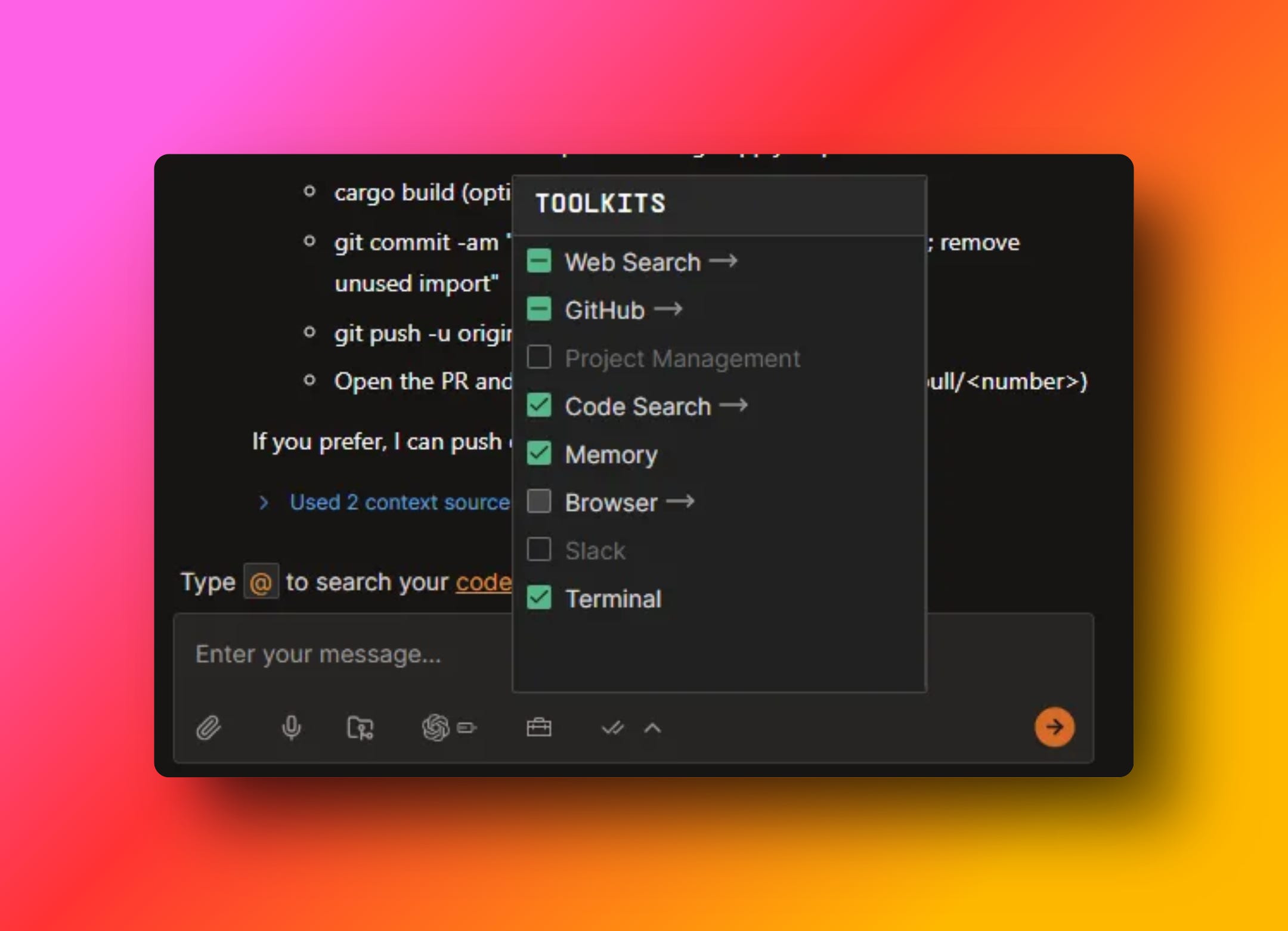
Factory is built around droids, specialized AI teammates you spin up for a task.
Each Droid ships with its own system prompt and tool belt tuned for the job (e.g., Code for edits, Knowledge for repo Q&A, Product for specs, Reliability for incidents, Tutorial for onboarding).
You work inside sessions with a shared context manager (what files/repos/tickets the Droid can see), and you can point a Droid at cloud workspaces or your machine via Factory Bridge when it needs to run commands locally.
It’s an assembly line of agents, each has its place, and your job is to assign the task and context to the right part in your factory, which assembles your code together individually.
When I got to meet the droids, I was blown away with how much one can achieve by improving upon existing models.
Meet the droids

Knowledge droid: explains the repo with file references; good at “what calls what.” Referenced and showed snippets that were helpful to quickly grasp code and functionality.
Product droid: planning felt crisp with GPT-5, less verbose, asked questions, kept options simple. Dare I say, the GPT-5 product droid in factory feels better than Opus in Claude Code at planning.
Code droid: does what the label says, but see the drift notes below.
Tutorial droid: helps you use Factory better. As a first-time user, I found this droid the most valuable time saver; just double-check claims in docs.
Reliability droid: A droid to actually go over error messages and use them to fix issues.
What worked well
Tutorial droid is really helpful for a first time user of Factory.
The knowledge and product droid are excellent at what they do.
The Factory Bridge lets the droids run CLI commands, manage local processes and use tool calls on your machine. Note: the folder you pick when installing the Factory Bridge is the only folder Factory can write to. Good design, but not clearly communicated; I had to reinstall to change it.
The internal tool MCPs are great and more nuanced, where Claude Code, Codex and others just give the agent access to the terminal, Factory has specific tools like ‘kill process’, which saves the Agent from having to trial-and-error PowerShell commands.
What didn’t
GitHub: If you have a lot of GitHub repos, Factory cannot fetch all of them but provides you with an arbitrary list. If your target repo isn’t in that set, it won’t work. The solution I found is to go on GitHub, manage permissions and restrict factory access to the repos you select. Then go back to Factory, refresh the page and link these repos, which are now available.
Instruction drift: The Code droid when using Sonnet had a habit of going beyond the task. GPT-5 did better, yet still ignored clear follow-ups sometimes.
Interruptions: the Stop button doesn’t always work. Closing and reopening the tab didn’t help until the run ended.
Droids sometimes re-read complete files to tweak something they just wrote.
The tutorial droid is sometimes confidently wrong about what you can do with Factory, which seems with better grounding.
Head-to-head #1: Fixing a GitHub issue
I’m building an “ML with Football” course with friends from the football analytics world. The open-source soccerdata repo is a valuable tool that needs occasional patching as data and site structures change. Recently, the page structure of FBRef changed, and the corresponding module needed fixing.
Codex wouldn’t fetch a live sample of the FBRef page and leaned on its remembered structure. Factory debated options but still needed me to point it to the breadcrumb path/XPath (which is a breadcrumb roadmap to a specific section of HTML).
I asked both to read the GitHub issue and patch it.
I then spelled out the fix: fetch a sample HTML from a specific URL, write a new XPath, and add an if guard.
Codex repeatedly claimed it had fetched a sample but kept using the old structure; only after failing a few times did it acknowledge it was relying on what it “remembered” rather than sampling the live page. Factory’s droids discussed alternatives, but required the exact breadcrumb path to proceed.
Both tools needed ground truth to stop guessing: Codex to actually fetch and inspect the page; Factory to be given the precise path. Without being given part of the solution, neither behaved like an autonomous bug-hunter here.
Head-to-head #2: building “Brandon” (whisper.cpp wrapper)
As I mentioned, I wish all my apps would have a voice mode as smooth as it feels in ChatGPT.
I use Wispr Flow, but it feels clumsy, and Wispr Flow requires an internet connection, a huge limitation.
I assume ChatGPT is using a version of Whisper, which is open source and has a C++ port that runs on your CPU (no internet connection needed!).

I explained the requirements to Codex and Factory.
The goal was to build a simple speech to text app on top of whisper.cpp for Windows, with hotkey initialization, clipboard and automatic pasting. An additional optional feature was to have a phrase that initializes it like “hey Brandon”.
I’m not very creative, so I named the app “Brandon”.
The “Brandon” Codex and Factory built are both apps I prefer over Wispr Flow.
Codex focused on simplicity and efficiency; Factory was more ambitious and built a more “commercial” app but required more prompting.
Building Brandon in Codex
I started building Brandon with the web interface, asking it to explain the whisper.cpp repo and discuss an implementation for Windows with me.
Codex did a great job analyzing the repo, and it made a persuasive case for building a native app to keep it simple instead of using Electron. I discussed this with Codex for a bit because it meant that if we ever wanted to port it to Mac, it would mean rebuilding the frontend. It convinced me though, arguing that the app’s goal is to be simple and lightweight, which means minimal code on either platform for the frontend.
Codex impressed me by how it planned, almost scarily similar to how I would do it; prune repo, build model, test; hotkey init, test; hook up local whisper server, test; minimal GUI.
I found it amusing (and great!) that it argued with me about its ideas, and, where Claude Code and Gemini usually add unnecessary complexity that leave me telling them to not overcomplicate, Codex switched these roles often telling me that simple is better until we have the MVP.
Codex needed reminders to log every step; otherwise, everything went smoothly.
After two sessions, I had a working app: hotkeys, clipboard + auto-paste, light on memory, no failed transcriptions so far. I’ve been using it, including for drafting parts of this piece.
Brandon by Codex feels less heavy than Wispr Flow and a natural extension to my laptop.
Building Brandon by talking to brandon to talk to codex to build Brandon.
Building Brandon with Factory
Factory failed to follow the agents.md instructions more often than Codex.
With Sonnet the coding droid went beyond the task often; this did not happen with GPT-5. I figure that’s model specific because I have experienced the same with Cursor.
Sonnet created a separate project to work on and rebuild everything from scratch the first time I used it with the Code Droid. Later I added an instruction to the agents.md to make it clear which repo it has to work on.
Claude ignored failing tests by… editing requirements in the markdown at one point.
Longer than that, direct instructions were sometimes completely ignored.
For example, at one point, the code droid was to implement the start and stop recording functions with the GUI buttons.
It only made it clickable but did not link any function to it and then marked the task as complete in its to-do list as well as in the project overview.
My reply was:
”Great job, you can now click the stop button, but clicking it does not stop the recording. Please make it call the `stop_recording` function”.
This is a clear instruction. What the droid did next was…
Completely ignore it.
”I see we completed milestone 2, wonderful, the start and stop recording buttons work now, I will proceed with milestone 3…..”
I then pointed out that it ignored all of my words, and at least it acknowledged this.
What is interesting here is that this was GPT-5. It’s something I’m used to with Sonnet and Opus, but as mentioned, GPT-5 has been much better at instruction following.
Except in Factory it seems and I think that’s because of lengthy, specific and verbose system prompts that may get fed into the model with every message and obscure all messages post the initial user instruction, I think Factory, as they also mention really want not just the droid, but also you to stay on task.
Quick tips (that actually help)
1. Context Handling
Scope Focus is everything. Keep the context clear. Plan, build, and debug in separate, task-specific arcs.
Aggressively curate context; add/remove files so the droid stays on task.
Lean into specialized droids; don’t make the Knowledge or Product droid “do code.”
2. Session Management
One feature at a time. Start a new session after each clear milestone.
Parallelize sessions, not prompts: while one agent codes, have another plan the next step or work on an independent branch and task.
Factory’s droids are a double-edged sword. The strong and meticulously crafted system instructions keep a droid on task, but they also limit it the longer a chat grows. They mention this in the docs; 40 to 80k tokens is the sweet spot. I think that’s fairly accurate. As a rule of thumb, after 2-3 follow-up messages, spin up a new session.
3. UI / CLI Strategy — Codex
Prefer the CLI; install the VS Code extension and work alongside it.
Take the extra 10 minutes to set up your environment right.
Branch and PR; don’t fear cloud parallelism.
4. UI / CLI Strategy — Factory
Skip the CLI for now.
With the bridge, pick your working folder carefully, thinking ahead; that’s the only write target.
Use the tutorial droid as a coach to get better at using factory, but verify claims in the docs when something doesn’t work.
5. Guardrails & Approvals
Use /approvals and read-only to chat with Codex worry-free.
Which one should you choose?
Short version: both are good, but they shine in different places.
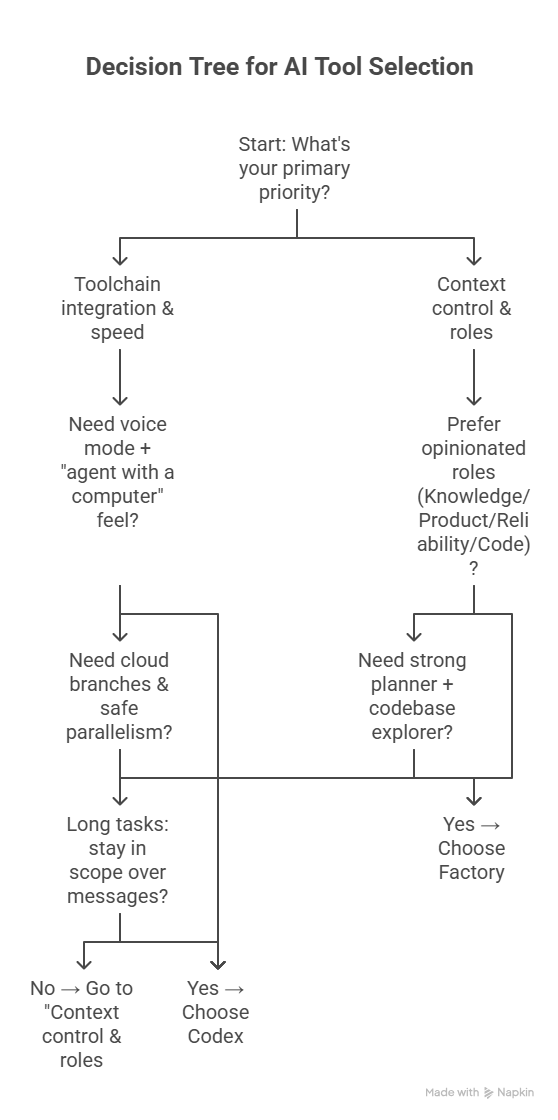
Choose Codex if you want…
A Swiss army knife with a great CLI, VS Code plugin and generous usage limits.
Voice mode and a smooth “agent with a computer” feel.
GPT-5 execution that stays in scope on longer tasks, over multiple messages.
Cloud branches and safe parallelism.
Choose Factory if you want…
Strong user-visible control over context.
Opinionated roles (Knowledge/Product/Reliability/Code) that keep an agent on task and also enhance its capabilities through strong prompt engineering.
An amazing planner and code base explorer.
If using both are an option, I would choose Factory for it’s knowledge and product droid and Codex for everything else.
What about Devin?
Devin is Cognition’s “AI software engineer”: a cloud agent that plans tasks, edits code, runs/tests in a sandbox, and opens PRs. Its workflow is explicitly Ticket → Plan → Test → PR, with its own editor/shell/browser and team integrations. Like Factory, Devin integrates with Slack, Linear and many other tools. Devin positions itself more as a team-centric AI teammate that owns tickets within a managed environment.
Devin is extra interesting now that Cognition acquired Windsurf.